DANAConnect APIs Authentication v2 (OAuth2)
The API v2 uses OAuth2 authentication with the Client Credentials grant type. This method is designed for server-to-server communication where no user interaction is required.
Prerequisites
- You must have a valid client application registered with DANAConnect
-
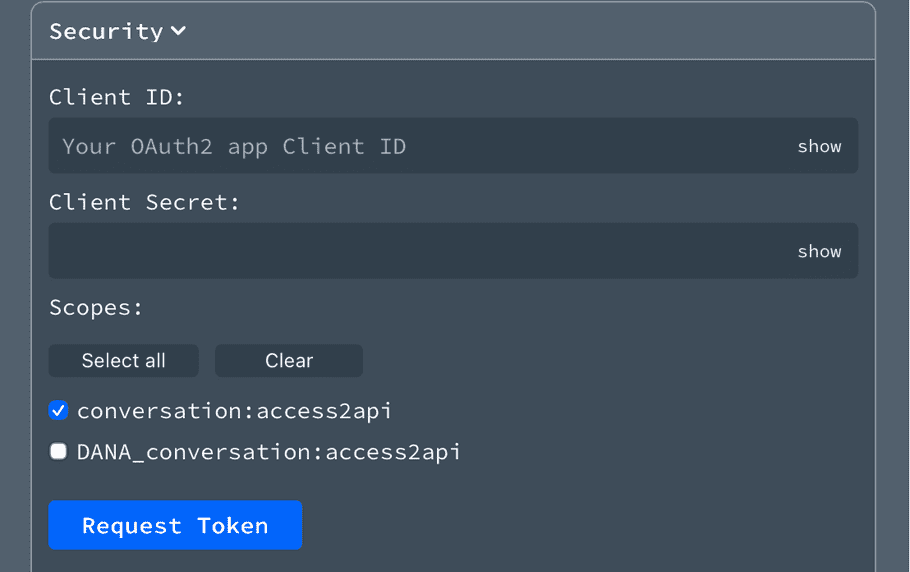
Your DANAConnect Account Manager will provide you with:
- Client ID : A unique identifier for your application
- Client Secret : A confidential key used to authenticate your application
Required Scope
Important: You must request the scope
conversation:access2apiwhen obtaining an access token. Without this scope, API requests will be rejected.
| Scope | Description |
|---|---|
conversation:access2api |
Required. Grants access to the Conversation API v2.0 endpoints |
Obtaining an Access Token
To authenticate, you need to request an access token from the OAuth2 token endpoint:
Token Endpoint: https://auth.danaconnect.com/oauth2/token
Request:
curl -X POST https://auth.danaconnect.com/oauth2/token \
  -H "Content-Type: application/x-www-form-urlencoded" \
  -d "grant_type=client_credentials" \
  -u "YOUR_CLIENT_ID:YOUR_CLIENT_SECRET" \
-d "scope=conversation:access2api"Response:
{
  "access_token": "eyJhbGciOiJSUzI1NiIsInR5cCI6IkpXVCJ9...",
  "token_type": "Bearer",
  "expires_in": 3600
}
Using the Access Token
Once you have obtained an access token, include it in the Authorization header of your API requests:
curl -X GET https://appserv.danaconnect.com/api/2.0/your-endpoint \
  -H "Authorization: Bearer YOUR_ACCESS_TOKEN" \
  -H "Content-Type: application/json"
Token Expiration and Renewal
-
Access tokens expire after the time specified in
expires_in(in seconds) - When a token expires, request a new one using the same client credentials
- It is recommended to implement token caching and refresh logic in your application to avoid unnecessary token requests
Security Best Practices
- Never expose your Client Secret in client-side code or public repositories
- Store credentials securely using environment variables or a secrets manager
- Use HTTPS for all API communications
- Implement proper error handling for authentication failures